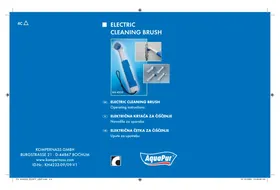
KH 4233 ELECTRIC CLEANING BRUSH - Electric cleaning brush KOMPERNASS - Free user manual and instructions
Find the device manual for free KH 4233 ELECTRIC CLEANING BRUSH KOMPERNASS in PDF.


| Product type | Electric cleaning brush |
| Brand | KOMPERNASS |
| Model | KH 4233 |
| Power supply | 4 AA 1.5 V batteries (Mignon type) |
| Protection type | IPX4 (splash-proof) |
| Supplied accessories | 4 interchangeable brushes, 4 batteries, 1 user manual |
| Intended use | Cleaning objects, especially hard-to-reach areas (not for body use) |
| Functions | Brush rotation via switch (temporary or continuous operation) |
| Maintenance | Clean brushes with water and mild detergent; housing with damp cloth |
| Housing material | Plastic |
| Approximate weight | About 200-300 g (with batteries) |
| Approximate dimensions | Length ~20 cm, diameter ~5 cm |
| Warranty | 3 years |
| Certifications | CE |
| Country of origin | Germany |
| Safety instructions | Do not immerse, wear protective goggles, keep out of reach of children |
| Disposal | Do not dispose of with household waste; comply with European Directive 2002/96/EC |
| Spare parts available | Interchangeable brushes (not specified whether sold separately) |
Frequently Asked Questions - KH 4233 ELECTRIC CLEANING BRUSH KOMPERNASS
User questions about KH 4233 ELECTRIC CLEANING BRUSH KOMPERNASS
0 question about this device. Answer the ones you know or ask your own.
Ask a new question about this device
Download the instructions for your Electric cleaning brush in PDF format for free! Find your manual KH 4233 ELECTRIC CLEANING BRUSH - KOMPERNASS and take your electronic device back in hand. On this page are published all the documents necessary for the use of your device. KH 4233 ELECTRIC CLEANING BRUSH by KOMPERNASS.
USER MANUAL KH 4233 ELECTRIC CLEANING BRUSH KOMPERNASS
Intended Usage 2
Items supplied 2
Technical Data 2
Safety instructions 2
The device components 4
Setting up the device 4
Cleaning and care 7
Disposal 7
CE Conformity 8
Warranty & Service 8
Importer 9
Read these operating instructions carefully before using the device for the first time and preserve this booklet for later reference. Pass this booklet on to whoever might acquire the device at a future date.
Intended Usage
This device is intended for the cleaning of objects, and especially for cleaning difficult to reach places. It is not suitable for commercial or industrial applications or for personal hygiene. No warranty will be granted for damages resulting from improper use of the device!
Items supplied
1 Brush drive/Hand element
4 Brush attachments
4 Batteries
1 Operating manual
Technical Data
Battery driven, 4 × 1.5V Batteries, AA, Mignon Safety type: IPX4
Safety instructions
- Do not permit children to handle electrical devices without supervision, as they cannot correctly assess the possible risks of injury.
- This device is not intended for use by individuals (including children) with restricted physical, physiological or intellectual abilities or deficiencies in experience and/or knowledge unless they are supervised by a person responsible for their safety or receive from this person instruction in how the device is to be used. Children should be supervised to ensure that they do not play with the device.
Risk of explosion!
- Do not throw batteries into a fire or subject them to high temperatures.
- Do not recharge batteries and do not short-circuit them.
- Never open batteries, never solder or weld batteries. The risk of explosions and injuries exists!
Information regarding the handling of batteries
- Regularly check the condition of the batteries. Leaking batteries can cause damage to the device.
- Always change all batteries at the same time and always use batteries of the same type.
- If you do not intend to use the device for an extended period, remove the batteries.
- In the event of the batteries leaking, put on protective gloves and then clean the battery compartment and the contacts with a dry cloth.
Risk of injury
-
Leaking battery acid can cause inflammation of the skin. Should battery acid make contact with the skin, rinse the affected area with copious amounts of water. If the liquid comes into contact with your eyes, rinse them thoroughly with clean water, do not rub them and immediately consult a doctor.
-
Keep batteries well away from children. Children can put batteries into their mouths and swallow them. If a battery is swallowed medical assistance must be sought immediately.
The device components
Flange for brush attachments
2 On/Off switch
Brush attachments
Brush drive/Hand element
Pressure area of the battery compartment opener
6 Battery compartment cover
Wrist cord
Setting up the device
Take all device components out of the carton and remove all packaging and adhesive foils.
⇒ Open the battery compartment by pressing on the pressure area of the battery compartment opener 5 and then removing the battery compartment cover 6 from the device.
⇒ Insert 4 × 1.5 V batteries, size AA Mignon, into the battery compartment as per the markings shown on the side of the separator in the battery compartment.
⇒ Replace the battery compartment cover ⑥. Thereby, the two point markings, on the battery compartment cover and on the battery compartment, must lie one above the other.
⇒ Select a suitable brush attachment 3, the choice criteria being the type of soiling that has to be removed and its positioning resp. extent:
- The two brush attachments ③ with blue/ white bristles are ideal for removing stubborn soiling, for example, on door hinges.
- For less stubborn soiling, use the brush attachment with white bristles, as these are softer and thus more suitable for the cleaning of chrome, leather and smooth surfaces, without scratching them.
- For soiling at difficult to reach locations use the brush attachment ③ with conically shaped bristles, for example, for the cleaning of ventilation slots.
⇒ Place the selected brush attachment ③ onto the flange ① for the brush attachments, such that the slots on the attachment glide onto the guide tracks on the flange ①.
⇒ Then turn the brush attachment ③ clockwise through approx. 45° to secure it firmly to the flange. The arrow symbol on the brush attachment ③ must then point towards the blue spot on the flange ①.
⇒ If required, place a suitable cleaning agent onto the bristles and then bring the device into position at the location to be cleaned. For stubborn soiling, especially on cars and motorbikes, a solvent may be necessary.

CAUTION
Particles of dirt and/or cleaning agent may be widely scattered by the rotating bristles. When using this device, protect your eyes with a pair of safety glasses! Take care not to soil your clothing.
When you press on the On/Off switch 1, the bristles rotate for as long as you hold the On/ Off switch 2 down.
⇒ If you slide the On/Off switch 2 in the direction of the brush attachment 3, the bristles will rotate continuously.
For difficult application situations, or if there is a risk that the device could fall into a difficult to reach location, you should pass your working hand through the wrist cord before starting to use the device.
⇒ To stop the bristle rotation, slide the On/Off switch 2 back into its start position.
To remove a brush attachment ③, first turn it anti-clockwise through approx. 45° then remove it.
⇒ Should the performance of the device diminish, this means the batteries are depleted. Replace them with new batteries of the same type.
Never submerge the device or its components in water or other fluids! Do not allow any liquids to penetrate into the housing. This could damage the device or cause a short circuit.
⇒ After use, clean the brush attachments with water and a mild detergent.
Cleaning the Brush drive/Hand element 4:
Clean the housing with a slightly damp cloth Never use petrol, solvents or detergents, they can damage plastics!
Disposal
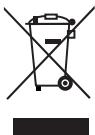
Do not dispose of the device in your normal domestic waste. This product is subject to the provisions of European Directive 2002/96/EC.
Cleaning brush
- Arrange for the product, or parts of it, to be disposed of by a professional waste disposal company or by your communal waste facility.
- Observe the currently applicable regulations. In case of doubt, please contact your waste disposal centre.
Batteries/rechargeable batteries
-
Used batteries/rechargeable batteries may not be disposed of in household waste.
-
Batteries/rechargeable batteries can contain toxic substances which may damage the environment. Therefore, dispose of the batteries/rechargeable batteries in accordance with statutory regulations.
- Every consumer is statutorily obliged to dispose of batteries/rechargeable batteries at a community collection centre in their district or to a dealer. The purpose of this obligation is to ensure that batteries are disposed of in a non-polluting manner.
- Only dispose of batteries when they are fully discharged.

Dispose of packaging materials in an environmentally responsible manner.
CE Conformity
This device has been tested and approved regarding conformance with the fundamental requirements and other relevant regulations of the EMV Directive 2004/108/EC.
Warranty & Service
The warranty for this appliance is for 3 years from the date of purchase. The appliance has been manufactured with care and meticulously examined before delivery. Please retain your receipt as proof of purchase. In the event of a warranty claim, please make contact by telephone with our Service Department. Only in this way can a post-free despatch for your goods be assured.
The warranty covers only claims for material and manufacturing defects, but not for transport damage,
for wearing parts or for damage to fragile components, e.g. buttons or batteries. This product is for private use only and is not intended for commercial use. The warranty is void in the case of abusive and improper handling, use of force and internal tampering not carried out by our authorized service branch. Your statutory rights are not restricted in any way by this warranty.
The warranty period will not be extended by repairs made under warranty. This applies also to replaced and repaired parts. Any damage and defects extant on purchase must be reported immediately after unpacking the appliance, at the latest, two days after the purchase date. Repairs made after the expiration of the warranty period are subject to payment.
GB DES UK LTD
Tel.: 0871 5000 700 (£ 0,10 / minute)
Fax: 0870/787-6168
e-mail: support.uk@kompernass.com
IE Kompernass Service Ireland
Tel: 1850 930 412 (0,082 EUR/Min.)
Standard call rates apply. Mobile operators may vary.
e-mail: support.ie@kompernass.com
Importer
KOMPERNASS GMBH
BURGSTRASSE 21
44867 BOCHUM, GERMANY
www.kompernass.com
KAZALO VSEBINE
STRAN



- INTENDED USAGE
- ITEMS SUPPLIED
- TECHNICAL DATA
- SAFETY INSTRUCTIONS
- RISK OF EXPLOSION
- INFORMATION REGARDING THE HANDLING OF BATTERIES
- RISK OF INJURY
- THE DEVICE COMPONENTS
- SETTING UP THE DEVICE
- CAUTION
- CLEANING THE BRUSH DRIVE/HAND ELEMENT 4
- DISPOSAL
- CLEANING BRUSH
- BATTERIES/RECHARGEABLE BATTERIES
- CE CONFORMITY
- WARRANTY & SERVICE
- GB DES UK LTD
- IE KOMPERNASS SERVICE IRELAND
- IMPORTER
- KAZALO VSEBINE
- STRAN
Brand : KOMPERNASS
Model : KH 4233 ELECTRIC CLEANING BRUSH
Category : Electric cleaning brush